
Multi-Stop Route Planner
In-app purchases

star
16.5K reviews

Rated for 3+
info
1M+
Downloads


About this app
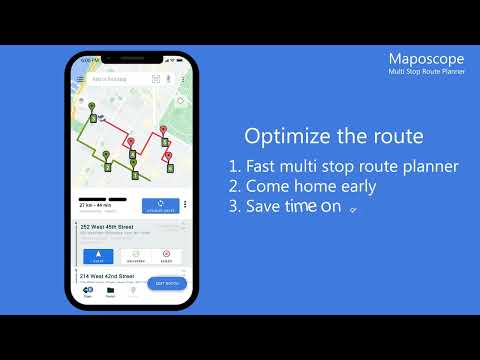
Creates the quickest delivery routes, saving you hours each day
Maposcope multi-stop route planner (Batch Geocode) automates delivery route planning and creates fastest routes in seconds with driving direction
Route Optimization up to 500 stops
A handful of useful functions for every delivery driver in our route planner:
✓ You can deliver up to 30% faster, saving two hours per day and getting home earlier
✓ PDF reports with your route planner details
✓ Support for time window, priority and visit time
✓ You can drag'n'drop markers on the map
✓ Unlimited maps and daily route optimization
✓ Send ETAs to your clients
✓ Setup stop’s delivery time window (service time)
✓ Easily check visit time
✓ Route finder with driving directions between the cities of your choice
✓ free route for delivery driver up to 10 stops
✓ The exact GPS location will help you deliver your shipments faster
✓ Our Route Planner creates the quickest delivery routes for your multi stop route
✓ Realtime Traffic Updates
Maposcope will determine the order of visited stops, show you when you will reach a specific location and how long the route will take between specific stops. You can plan your start time and start location, mark the priorities of the stops so that you can deliver the package or visit the urgent points first (ASAP). You can plot a route and routing app will find fastest delivery route with estmiated arrival times.
Set start location and start time, list of stops and we will find best route avoiding the disruptions on the route. Set service time, visit time and priority for each address multiple location. The route along with the time spent at the locations can be saved in a PDF report, saved to your disk or sent to your boss or client. Calculated Estimated Time of Arrival (ETA) will inform you (and your customers) of the time it takes for the products to arrive at the destination. GPS route tracking and progress monitoring with built-in reports. Our Route Planner will allow you to place multiple stops from a file (our batch geocoding superb technology), you can save addresses in Excel or csv files and upload it quickly to the map. You can easily move points around the map by simply holding down a pin and dragging it to another location. Easy plan delivery routes optimization with multiple stops.
State-of-the-art vehicle route optimization algorithm to create custom route with multiple stops
This Gps navigation for delivery vans, cars or even bikes is an excellent navigation app with easy to use GPS tracker. The app is now available as auto-renewable subscription but there is also free plan. Price may vary by location. Subscriptions will be charged to your credit card through your Google account. Your subscription will automatically renew unless canceled before the end of the current period. You can cancel your renewal at any time at this Play Store page or in your Google Play app.
Support
If you encounter any problems with the app, please email [email protected]
Maposcope multi-stop route planner (Batch Geocode) automates delivery route planning and creates fastest routes in seconds with driving direction
Route Optimization up to 500 stops
A handful of useful functions for every delivery driver in our route planner:
✓ You can deliver up to 30% faster, saving two hours per day and getting home earlier
✓ PDF reports with your route planner details
✓ Support for time window, priority and visit time
✓ You can drag'n'drop markers on the map
✓ Unlimited maps and daily route optimization
✓ Send ETAs to your clients
✓ Setup stop’s delivery time window (service time)
✓ Easily check visit time
✓ Route finder with driving directions between the cities of your choice
✓ free route for delivery driver up to 10 stops
✓ The exact GPS location will help you deliver your shipments faster
✓ Our Route Planner creates the quickest delivery routes for your multi stop route
✓ Realtime Traffic Updates
Maposcope will determine the order of visited stops, show you when you will reach a specific location and how long the route will take between specific stops. You can plan your start time and start location, mark the priorities of the stops so that you can deliver the package or visit the urgent points first (ASAP). You can plot a route and routing app will find fastest delivery route with estmiated arrival times.
Set start location and start time, list of stops and we will find best route avoiding the disruptions on the route. Set service time, visit time and priority for each address multiple location. The route along with the time spent at the locations can be saved in a PDF report, saved to your disk or sent to your boss or client. Calculated Estimated Time of Arrival (ETA) will inform you (and your customers) of the time it takes for the products to arrive at the destination. GPS route tracking and progress monitoring with built-in reports. Our Route Planner will allow you to place multiple stops from a file (our batch geocoding superb technology), you can save addresses in Excel or csv files and upload it quickly to the map. You can easily move points around the map by simply holding down a pin and dragging it to another location. Easy plan delivery routes optimization with multiple stops.
State-of-the-art vehicle route optimization algorithm to create custom route with multiple stops
This Gps navigation for delivery vans, cars or even bikes is an excellent navigation app with easy to use GPS tracker. The app is now available as auto-renewable subscription but there is also free plan. Price may vary by location. Subscriptions will be charged to your credit card through your Google account. Your subscription will automatically renew unless canceled before the end of the current period. You can cancel your renewal at any time at this Play Store page or in your Google Play app.
Support
If you encounter any problems with the app, please email [email protected]
Save time - take a shorter route
Updated on
Safety starts with understanding how developers collect and share your data. Data privacy and security practices may vary based on your use, region and age. The developer provided this information and may update it over time.


Ratings and reviews
16.1K reviews

abduraouf damon
- Flag inappropriate
25 October 2026
This app has seperated me from the rest of the drivers, in the best way possible. The only issue I have is tshe scanning address feature... I know that uploading the addresses onto a Pdf of csv doc is the best way but I don't always have the time to do this. Is there perhaps a way to using the scan option the right way?
MapoScope - Delivery Route Optimization Experts
26 October 2026
Yes, you can simply scan your list (the table containing addresses). If you have more question please send me email on [email protected]

Michael O'NEILL
- Flag inappropriate
23 September 2021
App has it's issues. Re-optimizing your routes midway through delivering is pretty sloppy. Sometimes I think the miles are off a little bit because the outline of the route isn't always following the roads exactly. Wish they had a trial period before you had to purchase to see if it was worth getting, because I definitely would not have paid for this one.
19 people found this review helpful
MapoScope - Delivery Route Optimization Experts
24 September 2021
Can you contact me by email [email protected], providing more information so that I can identify and solve the problem?

LàdÿJ Nailź 4'Eva
- Flag inappropriate
- Show review history
5 April 2023
I do not like the app after the last 4 updates made to the app. It's hard to see what I've delivered and what I hadn't delivered yet because the numbers on board are essentially the same when I click delivered. Also I can't add more once I've optimized. Edited: Apr.5.23. it's bad. Very bad now. Can't clear routes. I click "ear routs" but they're all still there you have to do it individually. Which takes so long so for this I don't reccomend
6 people found this review helpful
MapoScope - Delivery Route Optimization Experts
7 April 2023
Hi Justine,
Can you contact me by email [email protected] and give me more information, I'd be happy to find out what's wrong and restore some features if necessary?
What's new
- route planner navigation improved
- fixed package photos
- new batch geocoder, import from Excel files
- fixed package photos
- new batch geocoder, import from Excel files
App support
About the developer


